systemd
systemd contains a system and service manager that starts the rest of the system. It provides parallelization, uses socket and D-Bus activation for starting services, offers on-demand starting of daemons, keeps track of processes using Linux control groups, maintains mount and automount points, and implements a dependency-based service control logic. It also supports SysV and LSB init scripts and works as a replacement for sysvinit.
Other parts include a logging daemon, utilities to control basic system configuration like the hostname, date, locale, maintain a list of logged-in users and running containers and virtual machines, system accounts, runtime directories and settings, and daemons to manage simple network configuration, network time synchronization, log forwarding, and name resolution.
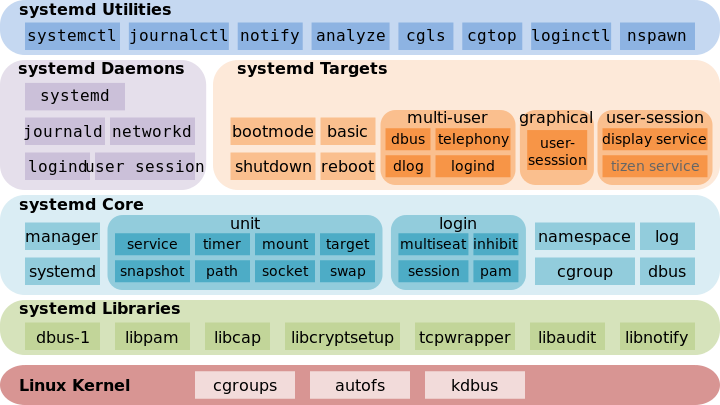
Quick Help
| Area | Command |
|---|---|
| Configuration | /etc/systemd/system |
| Update | systemctl daemon-reload |
| List | systemctl --type=service --all |
| Status | systemctl status NetworkManager.service |
| Start | sudo systemctl start ntpd.service |
| Stop | sudo systemctl stop ntpd.service |
| Send Signal | sudo systemctl kill -s SIGKILL rsyslogd.service |
| Enable | sudo systemctl enable ntpd.service |
| Disable | sudo systemctl disable ntpd.service |
| Dependencies | systemctl show -p Wants multi-user.target |
| Log Tail | journalctl -f |
| Service Log | journalctl -u ntpd.service |
| Log Range | journalctl --since=01:00 |
System State
Show system status:
$ systemctl status
● pc-alex
    State: degraded
     Jobs: 0 queued
   Failed: 1 units
    Since: Sat 2020-12-19 10:57:27 CET; 3h 49min ago
   CGroup: /
           ├─user.slice
           │ └─user-1000.slice
           │   ├─user@1000.service
           │   │ ├─xdg-permission-store.service
           │   │ │ └─1522 /usr/lib/xdg-permission-store
           │   │ ├─xdg-document-portal.service
           │   │ │ ├─1515 /usr/lib/xdg-document-portal
           │   │ │ └─1527 fusermount -o rw,nosuid,nodev,fsname=portal,auto_unmo>
           │   │ ├─xdg-desktop-portal.service
           │   │ │ └─1511 /usr/lib/xdg-desktop-portal
           │   │ ├─background.slice
...
List running units:
$ systemctl
  UNIT                                                                                   LOAD   ACTIVE SUB       DESCRIPTION
  mnt-ftp\x2dfritzbox.automount                                                          loaded active running   mnt-ftp\x2dfritzbox.automount
  proc-sys-fs-binfmt_misc.automount                                                      loaded active running   Arbitrary Executable File Formats File System Automount Point
  sys-devices-pci0000:00-0000:00:02.0-drm-card0-card0\x2deDP\x2d1-intel_backlight.device loaded active plugged   /sys/devices/pci0000:00/0000:00:02.0/drm/card0/card0-eDP-1/intel_backlight
  sys-devices-pci0000:00-0000:00:14.0-usb1-1\x2d10-1\x2d10:1.0-bluetooth-hci0.device     loaded active plugged   /sys/devices/pci0000:00/0000:00:14.0/usb1/1-10/1-10:1.0/bluetooth/hci0
  sys-devices-pci0000:00-0000:00:1c.7-0000:3b:00.0-net-wlp59s0.device                    loaded active plugged   Wi-Fi 6 AX200
  sys-devices-pci0000:00-0000:00:1d.0-0000:3c:00.0-nvme-nvme0-nvme0n1-nvme0n1p1.device   loaded active plugged   KXG60ZNV512G KIOXIA SYSTEM
  sys-devices-pci0000:00-0000:00:1d.0-0000:3c:00.0-nvme-nvme0-nvme0n1-nvme0n1p2.device   loaded active plugged   KXG60ZNV512G KIOXIA Microsoft\x20reserved\x20partition
  sys-devices-pci0000:00-0000:00:1d.0-0000:3c:00.0-nvme-nvme0-nvme0n1-nvme0n1p3.device   loaded active plugged   KXG60ZNV512G KIOXIA 3
  sys-devices-pci0000:00-0000:00:1d.0-0000:3c:00.0-nvme-nvme0-nvme0n1-nvme0n1p4.device   loaded active plugged   KXG60ZNV512G KIOXIA Windows_RE_Tools
  sys-devices-pci0000:00-0000:00:1d.0-0000:3c:00.0-nvme-nvme0-nvme0n1.device             loaded active plugged   KXG60ZNV512G KIOXIA
  sys-devices-pci0000:00-0000:00:1f.3-skl_hda_dsp_generic-sound-card0.device             loaded active plugged   Cannon Point-LP High Definition Audio Controller
  sys-devices-pci0000:00-0000:00:1f.6-net-enp0s31f6.device                               loaded active plugged   Ethernet Connection (6) I219-V
  sys-devices-platform-IFX0785:00-tpm-tpm0.device                                        loaded active plugged   /sys/devices/platform/IFX0785:00/tpm/tpm0
  sys-devices-platform-IFX0785:00-tpmrm-tpmrm0.device                                    loaded active plugged   /sys/devices/platform/IFX0785:00/tpmrm/tpmrm0
  sys-devices-platform-serial8250-tty-ttyS0.device                                       loaded active plugged   /sys/devices/platform/serial8250/tty/ttyS0
  sys-devices-platform-serial8250-tty-ttyS1.device                                       loaded active plugged   /sys/devices/platform/serial8250/tty/ttyS1
  sys-devices-platform-serial8250-tty-ttyS2.device                                       loaded active plugged   /sys/devices/platform/serial8250/tty/ttyS2
  sys-devices-platform-serial8250-tty-ttyS3.device                                       loaded active plugged   /sys/devices/platform/serial8250/tty/ttyS3
  sys-devices-virtual-misc-rfkill.device                                                 loaded active plugged   /sys/devices/virtual/misc/rfkill
  sys-module-configfs.device                                                             loaded active plugged   /sys/module/configfs
  sys-module-fuse.device                                                                 loaded active plugged   /sys/module/fuse
...
List failed units:
$ systemctl --failed
  UNIT                   LOAD   ACTIVE SUB    DESCRIPTION
● pkgfile-update.service loaded failed failed pkgfile database update

LOAD   = Reflects whether the unit definition was properly loaded.
ACTIVE = The high-level unit activation state, i.e. generalization of SUB.
SUB    = The low-level unit activation state, values depend on unit type.
Power Management
Using systemctl the system can also be restarted or shut down.
$ sudo systemctl halt           # Halts the system.
$ sudo systemctl poweroff       # Powers off the system.
$ sudo systemctl reboot         # Restarts the system.
$ sudo systemctl suspend        # Suspends the system.
$ sudo systemctl hibernate      # Hibernates the system.
$ sudo systemctl hybrid-sleep   # Hibernates and suspends the system.
Services
To check the services you can use the same commands but restrict the list to the service type:
$ systemctl --type=service --all
Start, Stop and Status
You can stop and start the service using the name with or without the service suffix:
$ sudo systemctl start ntpd
$ sudo systemctl stop ntpd
$ sudo systemctl restart ntpd
This commands won't output any details or problems. You can ever watch the syslog and service logs or check the status afterwards:
$ sudo systemctl status ntpd
● ntpd.service - Network Time Service
     Loaded: loaded (/usr/lib/systemd/system/ntpd.service; disabled; vendor preset: disabled)
     Active: active (running) since Sat 2020-12-19 16:59:14 CET; 3s ago
    Process: 46026 ExecStart=/usr/bin/ntpd -g -u ntp:ntp (code=exited, status=0/SUCCESS)
   Main PID: 46028 (ntpd)
      Tasks: 2 (limit: 18961)
     Memory: 1.7M
     CGroup: /system.slice/ntpd.service
             └─46028 /usr/bin/ntpd -g -u ntp:ntp

Dez 19 16:59:14 pc-alex ntpd[46028]: Listen and drop on 1 v4wildcard 0.0.0.0:123
Dez 19 16:59:14 pc-alex ntpd[46028]: Listen normally on 2 lo 127.0.0.1:123
Dez 19 16:59:14 pc-alex ntpd[46028]: Listen normally on 3 wlp59s0 192.168.178.96:123
Dez 19 16:59:14 pc-alex ntpd[46028]: Listen normally on 4 lo [::1]:123
Dez 19 16:59:14 pc-alex ntpd[46028]: Listen normally on 5 wlp59s0 [fd00::9ff5:8c16:7c7c:8dd5]:123
Dez 19 16:59:14 pc-alex ntpd[46028]: Listen normally on 6 wlp59s0 [fe80::51da:dc1b:5115:721a%3]:123
Dez 19 16:59:14 pc-alex ntpd[46028]: Listening on routing socket on fd #23 for interface updates
Dez 19 16:59:14 pc-alex ntpd[46028]: kernel reports TIME_ERROR: 0x6041: Clock Unsynchronized
Dez 19 16:59:14 pc-alex ntpd[46028]: kernel reports TIME_ERROR: 0x6041: Clock Unsynchronized
Dez 19 16:59:14 pc-alex systemd[1]: Started Network Time Service.
The primary fields here are:
| Field | Description |
|---|---|
| Loaded | Information whether the service unit has been loaded, the absolute path to the unit file, and a note whether the unit is enabled. |
| Active | Information whether the service unit is running followed by a time stamp. |
| Main PID | The PID of the corresponding system service followed by its name. |
| Status | Additional information about the corresponding system service. |
| Process | Additional information about related processes. |
| CGroup | Additional information about related Control Groups (cgroups). |
Hint
If a start failed too often the daemon will be locked. Then you have to reset the previous fails first:
$ sudo systemctl reset-failed <service>
$ sudo systemctl start <service>
Signals
You can also send a signal:
$ sudo systemctl kill -s SIGKILL rsyslogd
Enable or Disable
By enabling or disabling a service you define if the service should be started on each boot.
$ sudo systemctl enable ntpd
Created symlink /etc/systemd/system/multi-user.target.wants/ntpd.service → /usr/lib/systemd/system/ntpd.service.

$ sudo systemctl disable ntpd
Removed /etc/systemd/system/multi-user.target.wants/ntpd.service.
Automount
As initially said it is possible to mount devices on demand using systemd. I do this on my laptop fpr private and work environment. They try to mount in the moment I access them, making the first access slower but the bootup faster.
To do this add the x-systemd.automount option to the device.
curlftpfs#<ID>.myfritz.net /mnt/ftp-fritzbox fuse allow_other,uid=1000,gid=1000,umask=0022,noauto,x-systemd.automount 0 0
//192.168.XXX.XX/alex /mnt/alex cifs credentials=/root/.smbdiskstation,users,rw,uid=1000,gid=1000,iocharset=utf8,vers=2.0,domain=WORKGROUP,noauto,x-systemd.automount  0 0
Remote Machine
In addition to controlling the systemd system and service manager locally, the systemctl utility also allows you to interact with systemd running on a remote machine over the SSH protocol. Provided that the sshd service on the remote machine is running, you can connect to this machine by running the systemctl command with the --host or -H command line option:
$ systemctl --host user_name@host_name command
Log View
This is possible with journalctl which has it's internal message store in /var/log/journal and can query this and export in different formats.
$ journalctl -n 100         # last n lines
$ journalctl -f             # follow mode
$ journalctl -o short-iso   # short mode with ISO timestamps
$ journalctl -o json        # json
It has also the ability to do some more filtering:
$ journalctl -k             # kernel messages
$ journalctl -t <syslog>    # only the defined syslog identifier
$ journalctl -u ntpd        # only the defined unit
$ journalctl -g <grep>      # grep the message part
$ journalctl --since <date> # logs since given start date
The format can be like the syslog file:
Feb 19 21:23:27 pc-alex NetworkManager[107545]: INFO:   Interface ppp0 is UP.
Feb 19 21:23:27 pc-alex NetworkManager[107545]: INFO:   Tunnel is up and running.
Feb 19 21:23:32 pc-alex kwin_x11[1248]: qt.qpa.xcb: QXcbConnection: XCB error: 3 (BadWindow), sequence: 51777, resource id: 37751895, major code: 15 (QueryTree), minor cod>
Feb 19 21:23:37 pc-alex systemd[1]: NetworkManager-dispatcher.service: Succeeded.
DNS Resolver
Specific DNS nameserver for a given domain
If you need to resolve private hosts of a specific domains with a specific DNS you can configure this.
Change your configuration under '/etc/systemd/resolved.conf' or better make a copy under /etc/systemd/resolved.conf.d/ and edit it there:
[Resolve]
DNS=10.0.0.1 10.0.0.2
Domains=~example.com ~home
This will resolve Ü.example.com and *.home through the DNS 10.0.0.1 and 10.0.0.2.
Specified domain names has to be prefixed with "~". In this case they do not define a search path, but preferably direct DNS queries for the indicated domains to the DNS servers configured with the system DNS= setting.
Restart and test if it works:
systemctl restart systemd-resolved.service
resolvectl query alex.home
Setup
The configuration is done using unit files under /etc/systemd/system. systemd supports different unit types:
- service
- mount
- socket
- target (group)
- timer (cron replacement)
Each unit has it's own configuration. In case of compatibility with other init systems systemd will also automatically convert Sys-V or LSB-Init scripts into systemd configuration.
The systemd configurations are build like as /etc/systemd/system/<name>.service and has to be set to file mod 664:
[Unit]
Description=Simple <name> start

[Service]
Type=oneshot
RemainAfterExit=yes
ExecStart=/usr/local/sbin/<name>-start
ExecStop=/usr/local/sbin/<name>-stop

[Install]
WantedBy=multi-user.target
After the configuration was changed it has to be activated:
$ sudo systemctl daemon-reload
$ sudo systemctl enable <name>
$ sudo systemctl start <name>
Configuration
Unit files typically consist of three sections:
[Unit]— contains generic options that are not dependent on the type of the unit. These options provide unit description, specify the unit’s behavior, and set dependencies to other units.[<unit type>]— if a unit has type-specific directives, these are grouped under a section named after the unit type. For example, service unit files contain the[Service]section.[Install]— contains information about unit installation used by systemctl enable and disable commands.
Unit
Settings in the [Unit] section:
| Option | Description |
|---|---|
Description | A meaningful description of the unit. This text is displayed for example in the output of the systemctl status command. |
Documentation | Provides a list of URIs referencing documentation for the unit. |
After | Defines the order in which units are started. The unit starts only after the units specified in After are active. Unlike Requires, After does not explicitly activate the specified units. The Before option has the opposite functionality to After. |
Requires | Configures dependencies on other units. The units listed in Requires are activated together with the unit. If any of the required units fail to start, the unit is not activated. |
Wants | Configures weaker dependencies than Requires. If any of the listed units does not start successfully, it has no impact on the unit activation. This is the recommended way to establish custom unit dependencies. |
Conflicts | Configures negative dependencies, an opposite to Requires. |
Service
Settings in the '[Service]` section:
| Option | Description |
|---|---|
Type | Configures the unit process startup type that affects the functionality of ExecStart and related options. |
ExecStart | Specifies commands or scripts to be executed when the unit is started. Type oneshot enables specifying multiple custom commands that are then executed sequentially. |
ExecStartPre | Specify custom commands to be executed before ExecStart. |
ExecStartPost | Specify custom commands to be executed after ExecStart. |
ExecStop | Specifies commands or scripts to be executed when the unit is stopped. This may be specified multiple times to call commands in series. |
ExecReload | Specifies commands or scripts to be executed when the unit is reloaded. |
Restart | With this option enabled, the service is restarted after its process exits, with the exception of a clean stop by the systemctl command. |
RemainAfterExit | If set to True, the service is considered active even when all its processes exited. Default value is False. This option is especially useful if type oneshot is set. |
Possibly type values:
| Type | Description |
|---|---|
simple | The process started with ExecStart is the main process of the service. (default) |
forking | The process started with ExecStart spawns a child process that becomes the main process of the service. The parent process exits when the startup is complete. |
oneshot | A short-lived process that exits before starting consequent units and is expected to exit. |
dbus | Like simple, but notification of processes startup finishing is sent over dbus. |
notify | Like simple, but notification of processes startup finishing is sent over inotify. |
idle | Like simple, but the binary is started after all jobs are finished, which avoids mixing the status output with shell output of services. |
The ExecStart and ExecStop commands may use some prefixes like:
| Prefix | Effect |
|---|---|
@ | If the executable path is prefixed with @, the second specified token will be passed as argv[0] to the executed process (instead of the actual filename), followed by the further arguments specified. |
- | If the executable path is prefixed with -, an exit code of the command normally considered a failure is recorded, but has no further effect and is considered equivalent to success. |
: | If the executable path is prefixed with :, environment variable substitution is not applied. |
+ | If the executable path is prefixed with + then the process is executed with full privileges. This is like calling the process as root user. |
! | Similar to the + character discussed above this permits invoking command lines with elevated privileges. |
The prefixes @, -, :, and one of +, ! may be used together and they can appear in any order. If more than one command is specified, the commands are invoked sequentially in the order they appear in the unit file. If one of the commands fails (and is not prefixed with -), other lines are not executed, and the unit is considered failed.
Install
Settings in the [Install] section:
| Option | Description |
|---|---|
Alias | Provides a space-separated list of additional names for the unit. Most systemctl commands, excluding systemctl enable, can use aliases instead of the actual unit name. |
RequiredBy | A list of units that depend on the unit. When this unit is enabled, the units listed in RequiredBy gain a Require dependency on the unit. |
WantedBy | A list of units that weakly depend on the unit. When this unit is enabled, the units listed in WantedBy gain a Want dependency on the unit. |
Also | Specifies a list of units to be installed or uninstalled along with the unit. |
DefaultInstance | Limited to instantiated units, this option specifies the default instance for which the unit is enabled. |
The WantedBy setting defines the in which state the service has to be started (mostly multi-user.target is used):
| Target Units | Description |
|---|---|
basic.target | loaded active active Basic System |
bluetooth.target | loaded active active Bluetooth |
cryptsetup.target | loaded active active Local Encrypted Volumes |
getty.target | loaded active active Login Prompts |
graphical.target | loaded active active Graphical Interface |
local-fs-pre.target | loaded active active Local File Systems (Pre) |
local-fs.target | loaded active active Local File Systems |
multi-user.target | loaded active active Multi-User System |
network-online.target | loaded active active Network is Online |
network.target | loaded active active Network |
paths.target | loaded active active Paths |
remote-fs.target | loaded active active Remote File Systems |
slices.target | loaded active active Slices |
sockets.target | loaded active active Sockets |
sound.target | loaded active active Sound Card |
swap.target | loaded active active Swap |
sysinit.target | loaded active active System Initialization |
time-set.target | loaded active active System Time Set |
time-sync.target | loaded active active System Time Synchronized |
timers.target | loaded active active Timers |
Examples
- Verifying Bootup
- Which Service Owns Which Processes?
- How Do I Convert A SysV Init Script Into A systemd Service File?
- Killing Services
- The Three Levels of "Off"
- Changing Roots
- The Blame Game
- The New Configuration Files
- On /etc/sysconfig and /etc/default
- Instantiated Services
- Converting inetd Services
- Securing Your Services
- Multiple Instance Service